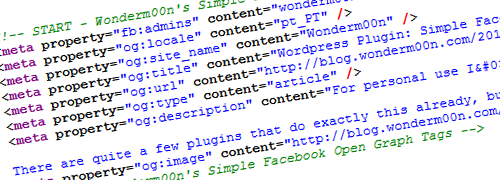
For personal use I’ve made a WordPress Plugin to include Facebook Open Graph Tags on the website/blog headers.
It also allows to insert the “enclosure” and “media:content” tags to the RSS feeds, so that apps like RSS Graffiti and twitterfeed post the image to Facebook correctly.
There are quite a few plugins that do exactly this already, but each and everyone of the ones I tested lacked something that I needed, so I decided to write this very simple plugin that allows you to decide which tags are included and may be useful to complement other plugins that you may be using to insert Facebook Open Graph tags to your website.

The inserted tags are:
- fb:app_id: From settings on the options screen.
- fb:admins: From settings on the options screen.
- og:locale: From WordPress locale or chosen by the user.
- og:site_name: From blog title.
- og:title: From post/page/archive/tag/… title.
- og:url: From the post/page permalink.
- og:type: “website”or “blog” for the homepage and “article” for all the others.
- og:description : From post/page excerpt if it exist, or from post/page content. From category/tag description on it’s pages, if it exist. From tagline, or custom text, on all the others.
- og:image: From post/page featured/thumbnail image, or if it doesn’t exist from the first image in the post content, or if it doesn’t exist from the first image on that post’s media gallery, or if it doesn’t exist from the default image chosen on the options menu.
Download the plugin at http://wordpress.org/extend/plugins/wonderm00ns-simple-facebook-open-graph-tags/
The plugin forum on WordPress.org: http://wordpress.org/tags/wonderm00ns-simple-facebook-open-graph-tags?forum_id=10
If you find this plugin useful and want to make a contribution towards future development please consider making a small, or big
, donation clicking this link.
Changelog:
- 0.4.1(2012-12-21)
- Added the ability to set/replace the Canonical URL tag. Very important for SEO in the “Business Directory Plugin” integration.
- 0.4(2012-12-21)
- “Business Directory Plugin” plugin integration. It’s now possible to populate “og:title”, “og:url”, “og:description” and “og:image” tags with each listing details. If a featured image is set it will be used. If not, the listing main image is used.
- 0.3.4(2012-12-10)
- Fixed a bug where all the settings could be lost when saving other plugins options (Shame on me!!)
- 0.3.3(2012-10-15)
- Fixed a bug where unset options would become active again. Thanks to @scrumpit.
- 0.3.2(2012-10-01)
- Fixed a typo on the settings page
- 0.3.1(2012-10-01)
- When saving the settings the $_POST array was showned for debug/development reasons. This output has been removed.
- 0.3(2012-10-01)
- “SubHeading” plugin integration. It’s now possible add this field to the “og:title” tag.
- Changed the way defaults and user settings are loaded and saved, to “try” to eliminate the problem some users experienced where the user settings would disappear.
- Bugfix: “Also add image to RSS/RSS2 feeds?” option was not being correctly loaded
- The plugin version is now showed both as a comment before the open graph tags and on the settings page
- 0.2.3(2012-09-26)
- No changes. Had a problem updating to 0.2.2 on the WordPress website.
- 0.2.2(2012-09-26)
- Bugfix: small change to avoid using the “has_cap” function (deprecated). Thanks to @flynsarmy.
- 0.2.1(2012-01-02)
- Bugfix when the og:image is not hosted on the same domain as the website/blog.
- 0.2(2012-01-02)
- If the option is set to true, the same image obtained to the og:image will be added to the RSS feed on the “enclosure” and “media:content” tags so that apps like RSS Graffiti and twitterfeed post them correctly.
- 0.1.9.5(2012-01-02)
- It’s now possible to choose how the post/page og:image tag is set. It means that if the user doesn’t want to use the featured/thumbnail image, or the first image in the post content, or the first image on the media gallery, or even the default image, he can choose not to.
- 0.1.9(2012-01-02)
- Added the og:locale tag. This will be the WordPress locale by default, but can be chosen by the user also.
- The og:type tag can now be set as ‘website’ or ‘blog’ for the homepage.
- A final trailing slash can now be added to the homepage url, if the user wants to. Avoids ‘circular reference error’ on the Facebook debugger.
- 0.1.8.1(2011-12-12)
- Fixed the namespace declarations
- 0.1.8(2011-12-12)
- Type ‘website’ was being used as default for all the urls beside posts. This is wrong. According to Facebook Open Graph specification only the homepage should be ‘website’ and all the other contents must bu ‘article’. This was fixed.
- On Category and Tags pages, their descriptions, if not blank, are used for the og:description tag.
- If the description comes out empty, the title is used on this tag.
- 0.1.7(2011-12-12)
- Changed the plugin priority, so that it shows up as late as possible on the <head> tag, and it won’t be override by another plugin’s Open Graph implementation, because other plugins usually don’t allow to disable the tags. If you want to keep a specific tag from another plugin, you can just disable that tag on this plugin options
- 0.1.6(2011-12-12)
- Settings link now shows up on the plugins list
- Small fix to ensure admin functions only are running when on the admin interface
- Some admin options now only show up when the tag is set to be included
- 0.1.5(2011-12-09)
- Fixed the way Categories and Tags pages links were being retrieved that would cause an error on WP 3.0
- Added the option to use a Custom text as homepage og:description instead of the Website Tagline
- Fixed a bug that wouldn’t allow to uncheck the og:image tag
- 0.1.4(2011-10-17)
- Shortcodes are now stripped from og:description
- Changed og:app_id and og:admins not to be included by default
- 0.1.3(2011-10-16)
- 0.1.2(2011-10-16)
- Fixing a bug for themes that do not support post thumbnail
- 0.1.1(2011-10-16)
- Adding Open Graph Namespace to the HTML tag
- 0.1(2011-10-16)
Please fell free to comment, ask any questions or make suggestions about the plugin using the comments bellow.